

SharePoint Shortcut Links: When the UI Gets in the Way
SharePoint Shortcut Links: When the UI Gets in the Way

SharePoint Shortcut Links for Admins and Power Users

SharePoint shortcut links are a lifesaver when the platform’s user interface decides to change without warning, which is often.

The SharePoint UI is constantly evolving. Buttons move, settings disappear, and some options only appear under specific contexts or permissions. One day, Site Settings is clearly visible. The next day, it’s buried or missing entirely. Modern SharePoint pages also hide many of the classic navigation paths that SharePoint admins and power users still depend on.

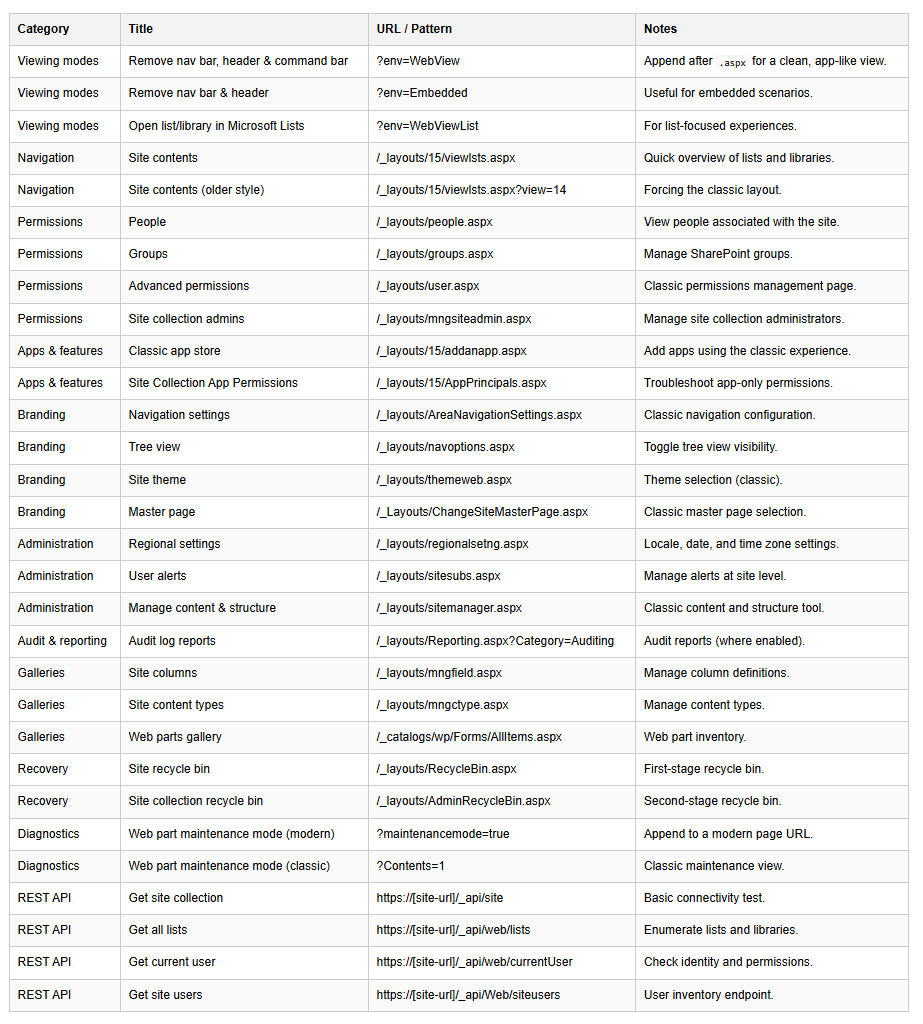
That unpredictability is why I keep a personal cheat sheet of direct SharePoint URLs and query string shortcuts. These links jump straight to commonly used SharePoint pages regardless of what the UI is doing that week.

If you manage SharePoint Online, work with Microsoft 365, or support users across multiple tenants, this list will save you time, clicks, and frustration.

How to Use These SharePoint Links

Commonly Used SharePoint Shortcut Links

Table Header Table Header Table Header Table Header
Content
Content
Content
Content
sharepoint shortcut links cheat sheet

Viewing Modes

Navigation

Permissions

Apps & Features

Branding

Administration

Audit & Reporting

Galleries

Recovery

Diagnostics

SharePoint REST API Shortcuts

Final Thoughts

Bookmarking these SharePoint admin URLs has saved me countless clicks and even more frustration when SharePoint decides to hide the exact setting I need most.

The UI may change, but SharePoint URLs rarely do. That alone makes keeping a shortcut list like this not just helpful, but essential for anyone managing SharePoint at scale.

If you work in SharePoint administration, Microsoft 365 support, or tenant governance, this cheat sheet is worth keeping close.

For reference, Microsoft documents the SharePoint REST API in detail on their official documentation site

Struggling With SharePoint Shortcuts and Navigation?

When SharePoint shortcut links create confusion or slow users down, it often points to underlying information architecture, permissions, or UI configuration issues that affect adoption and productivity.