


Microsoft 365 Security Audit Checklist for Brisbane & Gold Coast...
Read MoreSharePoint Shortcut Links: When the UI Gets in the Way
- Dec, Fri, 2025
SharePoint Shortcut Links for Admins and Power Users
SharePoint shortcut links are a lifesaver when the platform’s user interface decides to change without warning, which is often.
The SharePoint UI is constantly evolving. Buttons move, settings disappear, and some options only appear under specific contexts or permissions. One day, Site Settings is clearly visible. The next day, it’s buried or missing entirely. Modern SharePoint pages also hide many of the classic navigation paths that SharePoint admins and power users still depend on.
That unpredictability is why I keep a personal cheat sheet of direct SharePoint URLs and query string shortcuts. These links jump straight to commonly used SharePoint pages regardless of what the UI is doing that week.
If you manage SharePoint Online, work with Microsoft 365, or support users across multiple tenants, this list will save you time, clicks, and frustration.
How to Use These SharePoint Links
Most links are relative paths. Prefix them with your site URL, for example:
https://contoso.sharepoint.com/sites/MySite
Central Administration links
apply to SharePoint Server (on-premises) only—not SharePoint Online.
Query string parameters
(such as ?env=WebView) are appended after .aspx.
Commonly Used SharePoint Shortcut Links
| Table Header | Table Header | Table Header | Table Header |
|---|---|---|---|
Content |
Content |
Content |
Content |
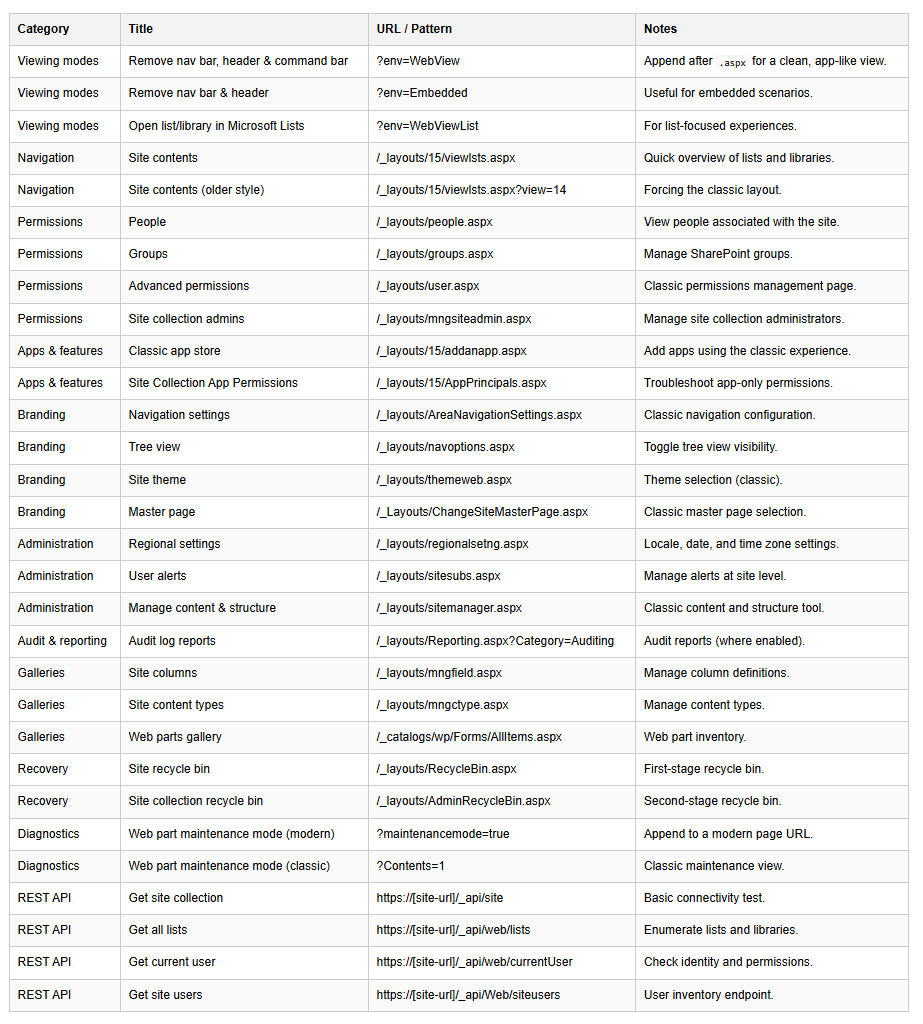
Viewing Modes
Open list or library in Microsoft Lists
?env=WebViewList
Ideal for list-focused workflows.Remove navigation bar and header
?env=Embedded
Useful for embedded SharePoint pages and iframe scenarios.Remove navigation bar, header, and command bar
?env=WebView
Append after .aspx for a clean, app-like SharePoint page view.
Navigation
Site contents
/_layouts/15/viewlsts.aspx
Quick overview of all lists and libraries.Site contents (classic view)
/_layouts/15/viewlsts.aspx?view=14
Forces the classic SharePoint layout.
Permissions
People
/_layouts/people.aspx
View users associated with the site.Groups
/_layouts/groups.aspx
Manage SharePoint groups and memberships.Advanced permissions
/_layouts/user.aspx
Classic permissions management page.Site collection administrators
/_layouts/mngsiteadmin.aspx
Manage site collection admins.
Apps & Features
Classic app store
/_layouts/15/addanapp.aspx
Add apps using the classic SharePoint experience.Site Collection App Permissions
/_layouts/15/AppPrincipals.aspx
Troubleshoot app-only and API permissions.
Branding
Navigation settings (classic)
/_layouts/AreaNavigationSettings.aspx
Tree view settings
/_layouts/navoptions.aspx
Master page selection
/_Layouts/ChangeSiteMasterPage.aspx
Site theme (classic)
/_layouts/themeweb.aspx
Administration
Regional settings
/_layouts/regionalsetng.aspx
Configure locale, date format, and time zone.User alerts
/_layouts/sitesubs.aspx
Manage content and structure
/_layouts/sitemanager.aspx
Classic content hierarchy management.
Audit & Reporting
Audit log reports
/_layouts/Reporting.aspx?Category=Auditing
Available where auditing is enabled.
Galleries
Site columns
/_layouts/mngfield.aspx
Web Parts gallery
/_catalogs/wp/Forms/AllItems.aspx
Site content types
/_layouts/mngctype.aspx
Recovery
Site recycle bin
/_layouts/RecycleBin.aspx
Site collection recycle bin
/_layouts/AdminRecycleBin.aspx
Diagnostics
Web Part maintenance mode (modern pages)
?maintenancemode=true
Append to a modern page URL.Web Part maintenance mode (classic pages)
?Contents=1
SharePoint REST API Shortcuts
Get site collection
https://[site-url]/_api/site
Get all lists and libraries
https://[site-url]/_api/web/lists
Get current user
https://[site-url]/_api/web/currentUser
Get site users
https://[site-url]/_api/Web/siteusers
Final Thoughts
Bookmarking these SharePoint admin URLs has saved me countless clicks and even more frustration when SharePoint decides to hide the exact setting I need most.
The UI may change, but SharePoint URLs rarely do. That alone makes keeping a shortcut list like this not just helpful, but essential for anyone managing SharePoint at scale.
If you work in SharePoint administration, Microsoft 365 support, or tenant governance, this cheat sheet is worth keeping close.
For reference, Microsoft documents the SharePoint REST API in detail on their official documentation site.
Struggling With SharePoint Shortcuts and Navigation?
When SharePoint shortcut links create confusion or slow users down, it often points to underlying information architecture, permissions, or UI configuration issues that affect adoption and productivity.


Creating SharePoint ECB Custom Actions Without the Add-In Model
A practical replacement pattern for Edit Control Block actions after...
Read More

Replacing SharePoint Add-In Authentication Before the April 2026 Retirement
Replacing SharePoint Add-In Authentication Before the April 2026 Retirement Replace...
Read More

Microsoft Teams and SharePoint Integration: 7 Powerful Collaboration Gains
How Microsoft Teams and SharePoint Integration Works Microsoft Teams and...
Read More